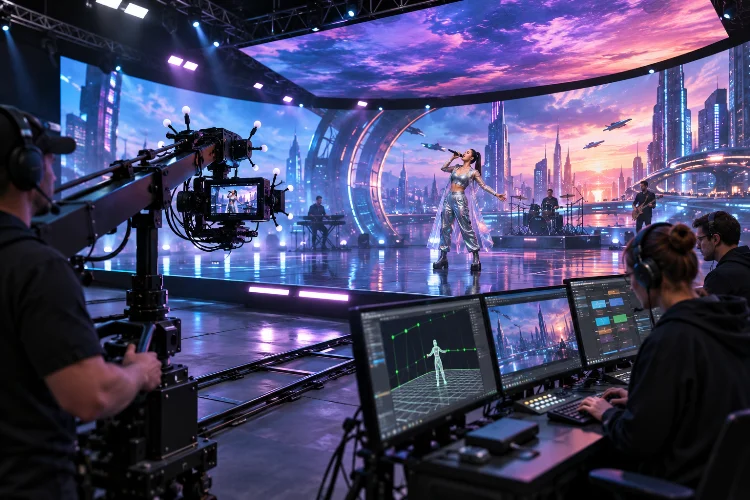
Imagine watching a digital concert where the stage transforms into a futuristic city, animated environments react to the music, and virtual cameras move naturally through impossible locations.
What looks like movie magic is increasingly becoming part of live entertainment production. Behind these experiences is a carefully coordinated combination of real-time rendering, camera tracking, and digital content management.
Advanced Virtual Production Workflows help creative teams connect those technologies without turning every show into a technical experiment.
By designing a clear production process, organizers can create immersive performances while maintaining the control, flexibility, and reliability that live events demand.
Understanding Virtual Production in Digital Entertainment
Virtual production brings computer-generated environments and traditional production techniques into a shared creative process.
Instead of building every visual effect after filming, teams can generate digital environments while performers, cameras, and lighting systems operate in real time.
This approach supports virtual concerts, online award ceremonies, esports broadcasts, and immersive entertainment experiences.
A music performance, for example, could feature a physical singer surrounded by an animated environment that changes with each song.
The production team can preview these visuals before the audience sees them.
However, virtual production isn’t simply about using impressive graphics. Successful workflows depend on coordinating content creation, technical systems, and live production decisions.
Building Real-Time Environments for Live Performances
Real-time rendering engines allow artists to develop interactive environments that can respond to changes during a performance.
Unreal Engine is commonly used in virtual production because it supports sophisticated graphics, virtual cameras, and connections with external production technologies.
Creating Flexible Digital Scenes
A practical workflow begins with concept development and digital asset preparation.
Artists create environments, lighting setups, animated objects, and scene transitions before assembling them into reusable sequences.
For example, a virtual music festival could use one digital city environment across several performances.
Different lighting, atmospheric effects, and camera positions would make each appearance feel distinct without requiring an entirely new scene.
This approach reduces unnecessary asset duplication.
Teams should also optimize texture sizes, geometric complexity, and visual effects to keep rendering performance predictable.
Complex graphics might look incredible in an editing session but struggle during a demanding live broadcast.
Connecting Camera Tracking With Virtual Environments
Camera tracking allows virtual environments to respond naturally to the movement of physical production cameras.
Without accurate tracking, digital backgrounds may appear disconnected from real performers.
Combining Physical and Virtual Camera Movement
Epic Games documents how in-camera visual effects combine LED displays, camera tracking, and real-time rendering.
When a physical camera changes position, the virtual environment updates its perspective accordingly.
This creates convincing depth and movement.
For example, an awards show might place presenters in front of an LED wall displaying a futuristic landscape.
As the camera moves sideways, the rendered background changes perspective to match.
However, accurate tracking requires careful lens calibration and coordination between the physical and digital systems.
Incorrect calibration can create visible alignment problems.
Production teams should test camera movement, focus changes, and lens settings during rehearsals rather than assuming everything will remain accurate.
Synchronizing Multiple Displays and Rendering Systems
Large entertainment productions often use several LED screens, projection surfaces, and rendering computers simultaneously.
Keeping those displays synchronized is essential for maintaining a consistent visual environment.
Using Distributed Rendering and Timecode
Unreal Engine’s nDisplay system can coordinate rendering across multiple computers and display surfaces.
Each rendering node handles assigned output regions while participating in a synchronized cluster.
For example, a concert stage might feature a massive central LED wall and two curved side displays.
A distributed rendering configuration can help create a continuous virtual scene across those surfaces.
Timecode and genlock provide additional synchronization capabilities.
At 60 frames per second, one frame lasts approximately 16.7 milliseconds. Even small timing differences may become noticeable during fast movement or complex camera transitions.
Careful timing prevents visuals from appearing misaligned and helps maintain consistent playback.
Integrating Lighting and Interactive Stage Effects
Virtual production becomes more immersive when digital environments and physical stage elements respond to the same creative direction.
Lighting systems, projection effects, and animated graphics should complement each other rather than compete for attention.
Connecting DMX With Real-Time Graphics
DMX is a communication standard widely used to control professional lighting equipment.
Unreal Engine includes DMX functionality that can communicate with lighting systems through supported network protocols.
This creates opportunities to coordinate physical lighting with rendered scenes.
Imagine a virtual concert where a digital sunrise gradually illuminates the environment.
Physical stage lights could transition through matching colors to reinforce the visual effect.
However, lighting cues should be carefully programmed and tested.
Poorly coordinated changes can create distracting transitions or unexpected brightness differences.
A clear cue sheet helps technicians understand which systems respond during each moment of the performance.
Organizing Creative Teams Around Shared Production Assets
Digital entertainment events often involve artists, technical directors, animators, lighting designers, and broadcast engineers.
Without clear coordination, even simple creative changes can introduce production problems.
A shared asset-management workflow helps maintain consistency.
For example, artists might update background textures while technical teams prepare camera tracking and rendering configurations.
Version control helps prevent unfinished changes from replacing approved content.
Teams should seperate experimental scenes from the versions approved for live use.
Every significant adjustment should also be documented so operators understand what changed.
A clearly defined approval process reduces confusion when deadlines become tight.
Testing Performance Before the Show Begins
Real-time production systems must deliver consistent performance throughout an event.
A scene that runs smoothly during a quiet rehearsal may struggle when additional effects, animations, and camera feeds become active.
Testing should reproduce the most demanding moments of the performance.
Evaluating Realistic Production Scenarios
For example, a virtual concert might combine multiple animated characters, dynamic lighting, particle effects, and rapidly changing camera angles.
Running these elements simultaneously helps reveal unexpected rendering bottlenecks.
Engineers should monitor GPU usage, frame timing, memory consumption, and rendering stability.
Teams also need to check camera calibration, display synchronization, and audio-video alignment.
A complete rehearsel should include unexpected situations, such as a missing tracking signal or an unavailable rendering node.
Having simpler backup scenes allows the production to continue if complex effects become unstable.
Reliable workflows prioritize a smooth audience experience over visual complexity alone.
Advanced Virtual Production Workflows allow entertainment creators to combine imaginative digital environments with dependable live production systems.
By coordinating rendering, camera tracking, display synchronization, lighting, and creative collaboration, teams can deliver immersive experiences with fewer technical surprises.
Before launching your next digital performance, map the complete production process, optimize your assets, and test every critical system. Strong preparation gives creativity more room to shine.