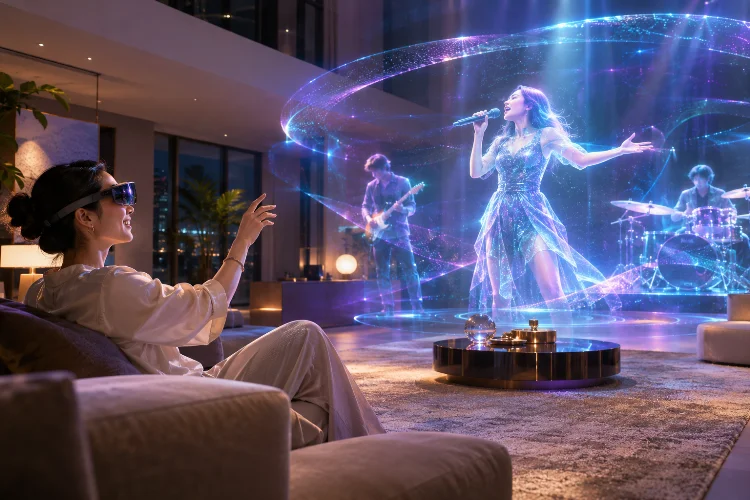
Imagine watching a concert where digital performers appear inside your living room, or exploring a movie universe where the story unfolds around you instead of staying inside a screen.
These experiences are becoming increasingly practical as spatial computing technology develops. However, impressive visuals alone won’t guarantee meaningful entertainment.
Advanced Spatial Computing Strategy helps digital platforms combine immersive environments, interactive storytelling, and natural user experiences.
Rather than treating augmented reality and virtual reality as technical gimmicks, entertainment companies can use spatial design to create experiences that feel comfortable, engaging, and genuinely different from traditional digital media.
Why Spatial Computing Changes Digital Entertainment
Traditional entertainment platforms usually organize content around flat screens, menus, and video players.
Spatial computing introduces a different relationship between audiences and digital content.
Instead of simply watching something, users can explore virtual environments, interact with three-dimensional objects, and experience digital elements within their physical surroundings.
For example, a streaming platform might offer an immersive movie theater where viewers select their seats and adjust their viewing environment.
A music platform could provide virtual backstage experiences featuring interactive artist content.
These possibilities create new creative opportunities, but they also introduce design challenges.
Developers need to consider physical comfort, navigation, device limitations, and how users naturally interact with objects in three-dimensional space.
Choosing the Right Level of Immersion
Not every entertainment experience needs a fully virtual world.
Sometimes, placing a three-dimensional object inside a familiar environment creates a more enjoyable interaction than completely replacing someone’s surroundings.
Balancing Mixed Reality and Virtual Reality
Apple’s visionOS design guidance distinguishes between experiences presented alongside a user’s physical surroundings and those displayed in a fully immersive space.
This flexibility allows developers to match immersion levels with specific entertainment activities.
For example, browsing movie recommendations might work better through floating interface panels.
Watching an interactive fantasy performance could benefit from a fully immersive enviroment.
The important question is whether increased immersion adds meaningful value.
A platform should allow users to enter and exit immersive modes comfortably rather than forcing them into complex virtual environments for simple tasks.
Designing Spatial Storytelling Around Audience Movement
Traditional filmmakers decide exactly what audiences see through camera framing.
Spatial entertainment changes that relationship because viewers may look around freely.
A dramatic moment happening behind someone could go unnoticed if the experience doesn’t provide enough guidance.
Using Environmental Cues to Direct Attention
Spatial storytelling can use lighting, directional sound, character movement, and environmental details to guide audience attention.
Imagine an interactive mystery experience where footsteps echo from a hallway.
The sound encourages viewers to turn toward a virtual doorway, revealing the next part of the story.
This approach feels more natural than constantly displaying arrows or instructions.
However, developers should avoid overwhelming users with competing visual effects.
Apple’s immersive design recommendations emphasize comfortable movement and avoiding distracting animations near the edges of a viewer’s field of vision.
Good spatial storytelling creates curiosity while keeping navigation intutive and manageable.
Using Spatial Audio to Build Emotional Connections
Sound plays an important role in creating convincing immersive environments.
A traditional stereo soundtrack can communicate atmosphere, but spatial audio introduces directional awareness.
Connecting Audio With Three-Dimensional Environments
Android XR documentation explains that spatial audio can simulate sound sources positioned throughout a three-dimensional environment.
As users change position, compatible systems can adjust how sounds are perceived.
Consider a virtual music festival where different instruments appear to originate from different parts of the stage.
A viewer turning toward a guitarist might perceive the instrument from a corresponding direction.
This creates a stronger sense of presence.
However, developers should maintain clear dialogue and avoid unnecessary audio complexity.
Accessibility options, captions, and adjustable sound levels remain important because not everyone experiences audio in the same way.
Creating Natural and Accessible Spatial Interactions
An immersive experience becomes frustrating when users struggle to understand how its controls work.
Traditional buttons and menus don’t always translate naturally into three-dimensional spaces.
Spatial platforms can support interactions through gestures, controllers, gaze-assisted selection, and other input methods.
However, these capabilities vary between devices.
Designing Comfortable Interaction Patterns
Developers should place interactive elements within comfortable viewing and reaching areas.
For example, a virtual entertainment gallery could allow users to select floating content cards without requiring exaggerated arm movements.
Important actions should provide immediate visual or audio feedback.
The W3C’s XR Accessibility User Requirements document highlights the importance of alternative input methods, orientation support, and customizable experiences.
These considerations help make immersive entertainment more accesible to diverse audiences.
A successful interaction system prioritizes clarity over complicated gestures that may look impressive but feel exhausting during extended sessions.
Testing Immersive Experiences Before Launch
Spatial applications introduce performance challenges beyond those found in traditional media platforms.
Rendering three-dimensional environments, processing tracking information, and responding to user movement all require computing resources.
Poor performance can reduce immersion and potentially cause discomfort.
Evaluating Comfort and Rendering Stability
Android XR design guidance recommends efficient three-dimensional models, appropriate textures, and careful shader usage to maintain smooth performance.
Developers should test demanding scenes rather than evaluating only simple environments.
For example, a virtual concert might combine animated performers, dynamic lighting, particle effects, and interactive audience elements.
Testing these features simultaneously can reveal performance bottlenecks.
Teams should also evaluate visual comfort during extended sessions.
User testing can uncover problems that technical measurements miss, including confusing navigation and distracting visual transitions.
A stable experience with fewer effects often feels better than a technically ambitious experience that constantly stutters.
Measuring Engagement Beyond the Novelty Factor
Spatial entertainment platforms need meaningful ways to evaluate whether immersive features actually improve the audience experience.
The number of people trying a new VR feature doesn’t automatically indicate long-term success.
Organizers should investigate whether users complete experiences, return for additional sessions, and express satisfaction.
Imagine a platform attracting 10,000 users to an immersive concert.
If 6,000 complete the experience, the completion rate is 60%, assuming each person participates only once.
That measurement provides useful context, but it doesn’t explain everything.
Feedback about comfort, navigation, and content quality can reveal why other participants left early.
By combining engagement measurements with user research, developers can identify which features deliver relevent value and which simply add unnecessary complexity.
Advanced Spatial Computing Strategy helps entertainment platforms create experiences that go beyond traditional screens without sacrificing accessibility or comfort.
Immersive storytelling, spatial audio, intuitive interactions, and careful performance testing all contribute to stronger audience experiences.
Before introducing new XR features, identify what audiences genuinely need and test those ideas with real users. The best spatial entertainment experiences make technology feel natural rather than complicated.