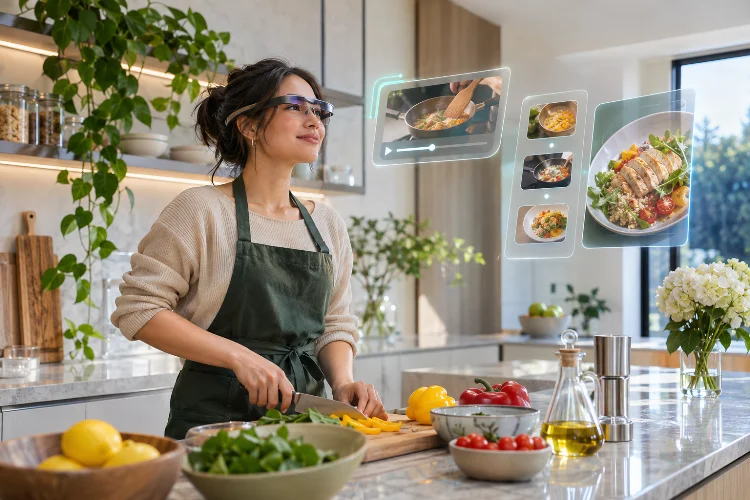
Imagine checking a video notification without reaching for your phone, following a recipe while keeping your hands free, or watching digital content appear naturally within your surroundings.
These experiences sound futuristic, but wearable display technology is already introducing new ways to interact with information. The interesting part isn’t simply having a smaller screen closer to your eyes. It’s how everyday digital habits might change.
Wearable Displays Could reshape media interaction by combining contextual information, spatial interfaces, and natural input methods. Understanding these possibilities helps designers create experiences that feel useful rather than unnecessarily complicated.
Moving From Traditional Screens to Glanceable Content
Smartphones have trained people to unlock devices, open applications, and navigate menus whenever they need information.
Wearable displays introduce another possibility: accessing selected content through quick visual interactions without repeatedly switching devices.
Understanding Glance-Based Media Experiences
Imagine listening to a podcast while walking through a quiet indoor space. A compatible wearable interface could briefly display the episode title, playback progress, or a saved recommendation.
The information appears when needed and disappears when attention returns elsewhere.
This approach encourages designers to prioritize essential details over complicated interfaces.
However, glanceable content shouldn’t mean constantly interrupting users with notifictions.
A well-designed system needs to understand which information deserves immediate attention and which updates can wait.
For example, playback controls might remain easily accessible, while promotional messages should rarely interrupt an ongoing activity.
The objective is reducing unnecessary screen interaction rather than simply moving every smartphone notification closer to someone’s eyes.
Replacing Touch Controls With Natural Interactions
Touchscreens work well because people understand tapping, scrolling, and swiping.
However, those interactions don’t always feel appropriate when using head-mounted displays or smart glasses.
Spatial computing introduces different input possibilities.
Combining Gaze, Gestures, and Voice Commands
Apple’s visionOS design guidelines describe interactions that combine eye direction with hand gestures.
Users can look toward interface elements and perform supported gestures to activate them.
For example, someone watching a floating video player could select a playback control without reaching toward a physical screen.
Voice commands may also support certain hands-free interactions.
However, these capabilities vary across devices, and constantly speaking commands isn’t practical in every environment.
Designers should provide several control options rather than assuming one method works for everyone.
An intutive interface minimizes complicated gestures and helps users understand how to complete basic tasks immediately.
Creating Flexible Spatial Media Environments
Traditional applications are usually restricted to rectangular screens.
Wearable spatial displays can place digital windows, three-dimensional objects, and media interfaces within a user’s visible environment.
This changes how people organize and consume digital content.
Designing Media Windows Around User Preferences
Imagine a viewer arranging a movie trailer, entertainment news feed, and music player within a comfortable virtual workspace.
Instead of switching between applications repeatedly, compatible spatial systems could display several interfaces simultaneously.
Apple’s visionOS supports shared spaces where applications can appear in movable windows.
This creates opportunities for more flexible multitasking.
However, placing too many windows around users can create visual clutter.
Designers need to consider viewing distance, readable typography, and the importance of each content element.
The best spatial layout isn’t necessarily the one displaying the most information.
It’s the arrangement that makes useful content easier to access without demanding excessive attention.
Changing How Notifications Compete for Attention
Notifications already influence how people interact with smartphones, streaming services, and social platforms.
Wearable technology could make this relationship even more immediate.
A notification appearing close to someone’s field of view may feel more intrusive than one waiting quietly on a phone.
For example, a viewer watching a virtual concert might appreciate a reminder about an upcoming interactive segment.
However, repeated recommendations and unrelated alerts could quickly disrupt immersion.
Platforms should give users meaningful control over notification timing, priority, and visibility.
Context-aware delivery may help, but it should never be treated as a perfect prediction of someone’s intentions.
A practical interface allows people to pause alerts, dismiss information, and return to their entertainment without unnecessary steps.
Prioritizing Visual Comfort and Physical Awareness
Comfort becomes especially important when digital information appears directly within someone’s field of view.
Long sessions, excessive brightness, and poorly positioned interfaces can reduce usability.
Designing Comfortable Viewing Experiences
Android XR’s design guidance emphasizes readable interface placement, manageable brightness, and thoughtful spatial layout.
These recommendations help developers avoid unnecessary visual fatigue.
For example, a floating media panel positioned too high could require repeated head movement.
Placing important controls within a comfortable viewing area may create a more relaxed experience.
Developers should also avoid requiring users to move around physically just to complete simple actions.
Different wearable devices offer different levels of environmental awareness.
Applications should respect those limitations and avoid encouraging distracting interactions near roads, stairs, or other hazards.
A good experiance should support the user’s surroundings rather than compete with them.
Making Wearable Media More Accessible
New interaction technologies create opportunities for accessibility, but they can also introduce new barriers.
Some users may find extended gestures uncomfortable, while others might require alternative visual or audio feedback.
The W3C’s XR Accessibility User Requirements document explores needs involving customizable controls, assistive technologies, captions, and alternative interaction methods.
For example, an entertainment application could provide adjustable text sizes, audio descriptions, and voice-based navigation where supported.
Users should also be able to reposition interfaces or select simpler interaction methods.
Accessibility features must remain easy to discover instead of being buried within complicated menus.
Supporting multiple ways to interact helps create more accesible experiences across different audiences.
Protecting Privacy While Understanding User Behavior
Wearable devices may use cameras, environmental sensing, and movement-related information to support spatial features.
These capabilities introduce important privacy considerations.
Apple’s visionOS privacy guidance describes system-managed sensor processing and authorization requirements for certain sensitive data.
Entertainment developers should follow similar principles by requesting only the information genuinely needed for a feature.
For example, a media player generally doesn’t need unrestricted information about a user’s physical environment to display an ordinary video.
Teams can measure playback completion, interaction errors, and user satisfaction without automatically collecting detailed gaze histories.
Transparent permissions and practical data controls help protect audience trust.
Privacy-conscious design may become just as important as impressive display technology.
Wearable Displays Could gradually change digital media interaction by making information more accessible, introducing natural controls, and allowing content to exist beyond traditional screens.
However, successful experiences will depend on comfort, accessibility, thoughtful notifications, and privacy protection.
Designers should begin with simple, useful interactions before introducing complex spatial features. The most valuable wearable experiences will make everyday media consumption easier, not more distracting.